Activity Monitor is already the right process list. If you want a lighter menu bar glance, and a record of why the day got worse, that is what Lume is for. If you want temperatures, every sensor, and a fan curve, that is a different product, and iStat Menus is the usual one. We keep Activity Monitor in the Dock on the machines Lume is built on. Lume cannot list those other apps, and it does not open Activity Monitor for you. Replacing that app was never the point.
| Activity Monitor | Lume | iStat Menus | |
|---|---|---|---|
| Process list and Force Quit | Yes | No | A menu bar process list is part of the full suite |
| Menu bar glance | No | Yes | Yes |
| Daily health score and sleep report | No | Yes | No |
| Hop-by-hop network check | No | Yes | No |
| Temperatures and fan control | No | No | Yes |
| Price | Included with macOS | Free, Pro is optional | Paid, with a trial |
What people mean by "alternative" is usually smaller. They want the number visible without a window. They want the menu bar app to cost almost nothing. They don't want a subscription for a CPU percentage. Some of them want fan curves and a temperature for every sensor. Those are three different products. Lume is only the first two.
Lume, iStat Menus, and other menu bar monitors
iStat Menus is the app this search usually means. It's thorough: a lot of sensors, a lot of menu bar items, graphs, history. It also isn't free, and it includes more than we wanted running in the menu bar all day. If you want the full instrument panel, that's the category you're already looking at. We have no interest in competing with it sensor for sensor.
There are free menu bar monitors, including open source ones that put a process list up top. Some are good. The failure mode we kept hitting, including in our own early builds, is the monitor showing up inside Activity Monitor as a thing using the CPU. A menu bar app that idles at several percent has become the problem it was installed to watch.
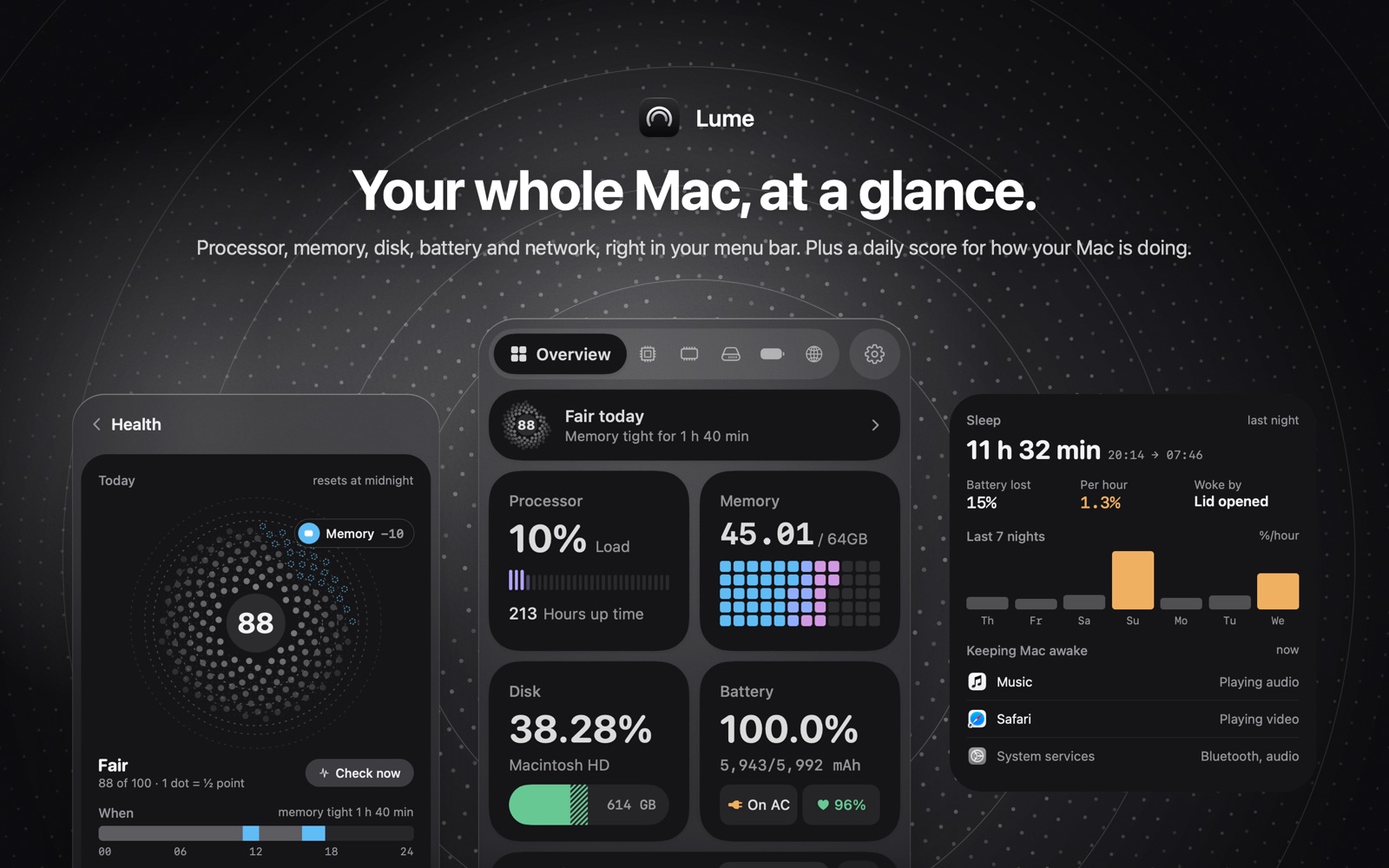
So the constraint on Lume is boring on purpose. You can choose which readings sit in the bar, and the style, so it doesn't turn into a scrolling ticker. Click one of them and the panel opens on that page: processor, memory, disk, battery, or network. The overview is there when you just want today's numbers in one place.
What Lume shows that Activity Monitor doesn't
A percentage tells you the Mac is busy now. It doesn't tell you that memory was tight for an hour and forty minutes around lunch, or that the chip throttled for ten minutes after that. Lume's health score starts each day at 100. Tight memory, heat throttling, a disk that's nearly full, Low Power Mode, or a slow network take points off, and only when they last a couple of minutes. The card shows which category cost points, and when. The categories are Memory, Temperature, Processor, Disk, Network, Battery, and Uptime. It does not name the app. For a memory problem you still quit the process in Activity Monitor.
That's the split: Lume stays in the menu bar for a quick look and for why the day got worse, and Activity Monitor handles the process list and Force Quit. The field guide for the CPU and Memory tabs is what's using CPU and memory on a Mac. The "fan is loud, now what" order is why a Mac is slow, or why the fan is loud.
Two other gaps bothered us enough to build pages for them.
Activity Monitor's Network tab counts data and packets per process, plus overall throughput. Useful, and it doesn't say whether the slowness is your Wi-Fi, the router, or the provider. Lume times the hop from the Mac to the router and the hop from the router to the internet, and shows Wi-Fi signal while the panel is open. The free version shows today's top three apps. Lume Pro shows every app's network use by week, month or year. On a hotspot it counts toward a limit you set and tells you which app is spending it. Photos syncing in the background is the classic one.
Sleep is the other. Activity Monitor's Energy tab has a Preventing Sleep column, so you can see that Safari is holding the Mac awake right now. It does not show the battery percent lost per hour last night, or what woke the Mac. That report is in Lume. The panel also names whether audio, a video, or Bluetooth is holding sleep right now.
What Lume leaves out, and what it sends on the network
A process list sorted by CPU. You have one. Per-sensor temperatures and a fan curve. That's a different kind of utility, and pinning a fan doesn't tell you which app made the heat. We record heat as throttling on the health score, not as RPM.
We also don't upload the readings. No account. History stays on the Mac. The traffic Lume does generate is dull: it checks the public IP through ipify when the network changes, plus short timing connections to 1.1.1.1 and 8.8.8.8 so the network check has something to measure. Those timing checks keep running with the panel closed, just less often. A system monitor stays open all day, so you should know exactly what network requests it makes.
Price, macOS 14, and Lume Pro
Today's numbers, the health score, and those alerts are included in the free app. The free version shows today's top three apps. Lume Pro shows every app's network use by week, month or year. Pro also adds a log of outages, health and memory trends, a battery-wear forecast, a disk-full forecast, and a short note on Mondays. Lume Pro is a one-time purchase of $9.99, with Family Sharing. History stays on the Mac. If you bought Lume back when the download cost money, Pro is included. We weren't going to charge those people again when 0.2.0 went free.
Lume 0.2.0 shipped on November 9, 2026, and the download has been free since that version. It needs macOS 14 or later. There's no ad in it. Pro is the only purchase, and you can ignore Pro forever and still have the menu bar, the score, the network check, and the sleep report.
Install Lume if you want that glance and you're willing to keep Activity Monitor for the moment you need a process name. Skip Lume if you want fan control, or a process list in the menu bar. Your Mac already comes with Activity Monitor.
The product page has the screens. The install is on the Mac App Store.